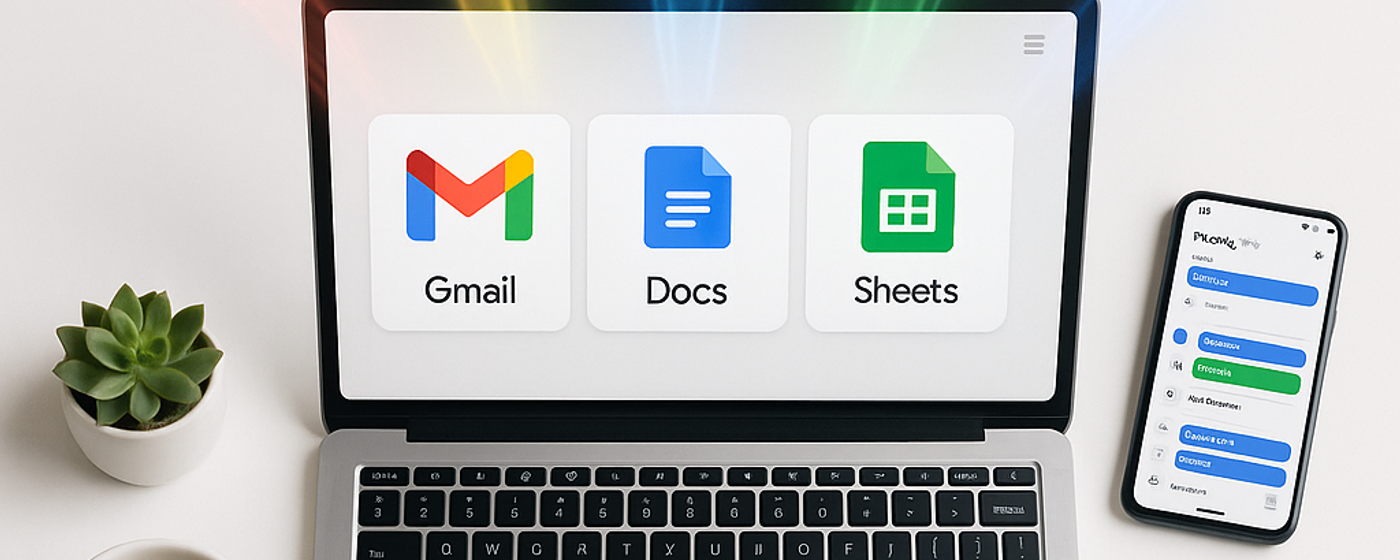
If your team uses Gmail, Google Docs, Google Drive, and Google Meet, you are already using the building blocks of Google Workspace. What you might not realise is how much more the platform can do when those tools are connected under a single subscription — with a custom domain, admin controls, enterprise-grade security, and Google’s AI assistant Gemini woven into every app.
This guide covers everything: what Google Workspace actually is, what every core app does, who it is built for, how it compares to the free Google tools you may already know, and the specific ways it can benefit individuals, small businesses, and growing teams.
What is Google Workspace?
Google Workspace is Google’s cloud-based productivity and collaboration platform for businesses, teams, and organisations. It bundles all of Google’s core applications — Gmail, Google Drive, Google Docs, Google Sheets, Google Slides, Google Meet, Google Chat, Google Calendar, Google Forms, Google Sites, Google Keep, and Google Vids — into a single paid subscription with business-grade features layered on top.
Before 2020, it was called G Suite. Google rebranded it to Google Workspace to reflect the platform’s evolution from a collection of separate apps into a unified working environment where email, documents, video calls, and chat flow together seamlessly. The apps themselves are the same ones billions of people use for free — but the Workspace subscription adds custom email domains, significantly more storage, admin and security controls, compliance tools, and deep integration with Gemini, Google’s AI assistant.
Everything runs in the cloud. There is no software to install, no servers to maintain, and no files to back up manually. You open a browser, sign in, and your entire office is there — on any device, from anywhere.
What does Google Workspace include? A breakdown of every core app
Google Workspace is not a single product — it is a suite of interconnected applications, each handling a different part of your workflow. Here is what each one does and why it matters.
Gmail — professional email on your own domain
Gmail needs little introduction — it is the world’s most widely used email platform. With Google Workspace, you get Gmail on your own custom domain (you@yourcompany.com instead of you@gmail.com), which instantly makes your business look more professional. You also get significantly reduced spam, built-in search that actually works, email delegation, mail merge for personalised campaigns (Business Standard and above), and the Gemini AI assistant to help draft, summarise, and proofread emails directly inside your inbox.
Google Drive — cloud storage and file management
Google Drive is your team’s central file system in the cloud. Every file — documents, spreadsheets, presentations, PDFs, images, videos — lives in Drive and can be shared with anyone inside or outside your organisation with granular permission controls. Workspace plans start at 30 GB of pooled storage per user (Business Starter) and go up to 5 TB per user (Business Plus), with unlimited storage available on Enterprise plans. Files created in Google Docs, Sheets, and Slides do not count toward your storage limit.
Drive also includes Shared Drives for team-owned files (so documents do not disappear when someone leaves the company), offline access, ransomware detection and file restoration, and AI-powered search that surfaces what you need before you finish typing.
Google Docs, Sheets, and Slides — collaborative content creation
Google Docs is a word processor. Google Sheets is a spreadsheet tool. Google Slides is a presentation builder. If you have used Microsoft Word, Excel, or PowerPoint, you already know the basics — but Google’s versions are built for real-time collaboration from the ground up. Multiple people can work in the same document simultaneously, with changes appearing instantly and a complete version history saved automatically.
All three apps are fully compatible with Microsoft Office file formats — you can open, edit, and save .docx, .xlsx, and .pptx files natively without converting them. Gemini is integrated into all three: it can help you write, generate images, build spreadsheet formulas, troubleshoot errors, create entire presentations from a prompt, and fill in data automatically using contextual AI.
In 2026, Sheets also doubled its cell limit and added canvas visualisations for building custom interactive mini-apps directly inside a spreadsheet — a significant upgrade for teams that rely on Sheets for reporting and dashboards.
Google Meet — video conferencing and virtual meetings
Google Meet is Google’s video conferencing tool. It supports high-definition video calls, screen sharing, live captions, breakout rooms, polls, Q&A sessions, and recording. With Workspace, you get longer meeting durations, more participants (up to 500 on Business Plus), noise cancellation, and the ability to record meetings directly to Google Drive.
The standout feature in 2026 is “Take notes for me” — Gemini listens to your meeting and generates structured notes with action items automatically. It also now includes visual screenshots in the notes, speech translation across languages in real time, and a centralised meeting hub where all your notes, transcripts, and recordings are organised in one place. For teams tired of post-meeting admin, this is genuinely transformative.
Google Chat — messaging and team communication
Google Chat is Google’s messaging platform for teams — think of it as Google’s answer to Slack or Microsoft Teams. It supports direct messages, group conversations, and Spaces (persistent channels for teams, projects, or topics). You can share files from Drive, start a Meet call with one click, and collaborate on documents without leaving the chat window.
In 2026, Google added external group conversations (so you can chat with clients and partners directly), interoperability with Microsoft Teams via NextPlane, guest accounts for non-Workspace users, and “Ask Gemini in Chat” — an AI assistant you can query directly in any conversation for instant answers, summaries, and content generation.
Google Calendar — scheduling and time management
Google Calendar handles scheduling for individuals and teams. It integrates directly with Gmail (events mentioned in emails are added automatically), Meet (every calendar event gets a video link), and Chat. You can share calendars across your organisation, set booking pages for external scheduling, and use Gemini to suggest optimal meeting times based on everyone’s availability.
Google Forms — surveys, quizzes, and data collection
Google Forms lets you build surveys, feedback forms, quizzes, and registration pages in minutes. Responses flow directly into Google Sheets for analysis. Gemini can now generate entire forms and quizzes from a prompt, and you can set forms to automatically stop accepting responses based on a date, time, or response count.
Google Keep — quick notes and lists
Google Keep is a lightweight note-taking app for capturing ideas, to-do lists, and reminders on the go. Notes sync across all your devices and can be pinned, labelled, colour-coded, and shared with collaborators. It is not a replacement for a full project management tool, but for quick-capture notes and shared checklists, it is fast and simple.
Google Sites — simple website and intranet builder
Google Sites lets you build internal websites, project hubs, and team intranets without writing code. You drag and drop content — text, images, embedded Docs, Sheets, Slides, videos, calendars — and publish in minutes. It is not designed for public-facing marketing sites, but for internal documentation, onboarding portals, and project dashboards, it is remarkably useful and completely free within Workspace.
Google Vids — AI-powered video creation
Google Vids is the newest addition to the Workspace suite — a video creation tool that lets you produce professional-looking videos, training materials, and presentations without any video editing experience. It includes AI avatars (including custom branded ones you can create from your own likeness), AI voiceovers in dozens of languages, AI-generated music, screen recording, and the ability to convert Google Slides into narrated videos automatically. It is designed for internal communications, sales enablement, onboarding, and training — not Hollywood production, but genuinely polished business video.
Workspace Studio — AI automation agents
Workspace Studio is Google’s no-code automation tool, launched in early 2026. It lets you build AI-powered agents and workflows that connect your Workspace apps — for example, automatically summarising new emails and posting the summaries to a Chat space, or creating calendar events from form submissions. Think of it as Google’s version of Zapier, but natively integrated into every Workspace app and powered by Gemini.
Google Workspace vs. free Google apps: what is the difference?
Anyone with a personal Google account can use Gmail, Docs, Sheets, Slides, Drive, Meet, and Calendar for free. So what do you actually get by paying for Google Workspace? The key differences fall into five categories:
Professional email on your domain. Free Gmail gives you a @gmail.com address. Workspace gives you you@yourcompany.com — a small change that makes a large difference in how prospects, clients, and partners perceive your business.
Significantly more storage. Free Google accounts come with 15 GB shared across Gmail, Drive, and Photos. Workspace plans start at 30 GB per user (pooled across the organisation) and go up to 5 TB per user or unlimited, depending on the plan.
Admin and security controls. Workspace includes a full admin console where you can manage users, set password policies, enforce two-factor authentication, control which apps are enabled, configure data loss prevention rules, audit activity logs, and manage devices remotely. Free accounts have none of this.
Business features. Shared Drives (team-owned storage), eSignature in Docs, advanced Meet features (recording, noise cancellation, more participants), Google Vault for compliance and archiving, endpoint management, and 24/7 phone, email, and chat support.
Gemini AI across every app. While free accounts get basic Gemini access, Workspace subscriptions include the full Gemini integration across Gmail, Docs, Sheets, Slides, Meet, Chat, and Drive — with features like “Help me write,” formula generation, meeting note-taking, and the new Workspace Studio automation builder.
How Google Workspace benefits individuals and freelancers
If you are a freelancer, consultant, or solo professional, Google Workspace solves three immediate problems. First, a custom email domain makes you look like a real business, not someone working from a bedroom (even if you are). Second, the storage upgrade means you stop getting “storage full” warnings. Third, the Gemini AI tools genuinely speed up day-to-day work — drafting proposals in Docs, building invoices in Sheets, and creating client presentations in Slides becomes measurably faster.
At seven dollars per month for the Business Starter plan, it costs less than most people spend on coffee in a week — and it replaces the need for separate subscriptions to email hosting, cloud storage, and office software.
How Google Workspace benefits small businesses
For small businesses, the biggest benefit is having everything in one place. Email, file storage, documents, video calls, team messaging, calendars, forms, and now AI automation — all under one login, one bill, one admin console. There is no integration to build, no data sync to maintain, and no separate vendor to manage for each capability.
The collaboration features are where small teams feel the difference most. When a team of five can co-edit a proposal in real time, comment and resolve feedback inline, and share the final version with a client via a single link — all without emailing attachments back and forth — the time savings compound fast. Projects that used to involve version-control chaos (“proposal_v3_FINAL_FINAL.docx”) become clean, single-source-of-truth workflows.
Google Workspace also scales predictably. Adding a new team member means adding a new user in the admin console — they immediately get their own email address, storage allocation, and access to every shared file and calendar. Removing someone when they leave revokes access and preserves their files in Shared Drives. For businesses growing from five people to fifty, that simplicity matters.
How Google Workspace benefits growing and mid-sized teams
As teams grow beyond ten or fifteen people, the admin and security features become critical. Google Workspace lets you enforce security policies across the entire organisation — mandatory two-factor authentication, device management, data loss prevention rules that prevent sensitive information from being shared externally, and audit logs that show exactly who accessed what and when.
The compliance tools are substantial. Google Vault provides archiving, retention, and eDiscovery for Gmail, Drive, Chat, and Meet. Data regions let you control where your data is stored geographically. Client-side encryption gives you exclusive control over your encryption keys. For industries with regulatory requirements — legal, financial services, healthcare — these features can be the difference between Google Workspace being viable and not.
Migration is also getting easier. In 2026, Google introduced native data import tools for Microsoft OneDrive, Microsoft Teams, and Dropbox — so moving from a Microsoft or hybrid environment to Google Workspace no longer requires expensive third-party migration tools. Small businesses can even import users directly from Microsoft to Workspace in a few clicks.
The Gemini advantage: AI built into every tool
The single biggest evolution in Google Workspace over the past two years is the integration of Gemini, Google’s AI assistant, into every core app. This is not a bolt-on chatbot — it is embedded functionality that works where you already work:
In Gmail, Gemini drafts replies, summarises long email threads, proofreads your writing, and helps you schedule meetings by analysing everyone’s calendars. In Docs, it writes first drafts, generates and edits images, and resolves comments with suggested text. In Sheets, it builds formulas, fills in data contextually, troubleshoots errors, and generates charts. In Slides, it creates entire presentations from a text prompt. In Meet, it takes notes, generates action items, translates speech in real time, and captures visual screenshots of key moments. In Chat, you can ask Gemini questions and get instant answers grounded in your Workspace data.
The practical impact is that tasks which used to take fifteen or twenty minutes — drafting an email, building a formula, summarising a meeting — now take two or three. Across a team of ten people, that is hours recovered every day. And because Gemini learns from context (it can reference your Drive files, emails, and calendar), its suggestions are specific to your work, not generic.
Pricing: what does Google Workspace cost?
Google Workspace offers four main business plans, all priced per user per month on an annual commitment:
Business Starter at seven dollars per user per month — includes Gmail on your domain, 30 GB pooled storage per user, all core apps, Gemini in Gmail, and 100-participant Meet calls. This is the entry point for freelancers and very small teams.
Business Standard at fourteen dollars per user per month — adds 2 TB pooled storage per user, Gemini across all Workspace apps, recording in Meet, 150-participant calls, eSignature in Docs, and AppSheet for no-code app building. This is the sweet spot for most small and mid-sized businesses.
Business Plus at twenty-two dollars per user per month — adds 5 TB pooled storage per user, 500-participant Meet calls, advanced endpoint management, Google Vault for compliance, and enhanced security controls. Built for businesses with stricter compliance or security requirements.
Enterprise — custom pricing for large organisations needing unlimited storage, advanced data loss prevention, S/MIME encryption, access transparency, and the full security and compliance suite. All plans come with a free fourteen-day trial, so you can test the full experience before committing.
Getting started with Google Workspace
Setting up Google Workspace takes less than thirty minutes. You choose a plan, verify your domain (or buy one during setup), create user accounts for your team, and configure your DNS records to route email through Gmail. Google provides step-by-step guidance for every stage, and their 24/7 support team is available by phone, email, and chat if you get stuck.
If you are migrating from Microsoft 365, Outlook, or another email provider, Google’s data import tools handle the heavy lifting — transferring emails, files from OneDrive or Dropbox, and even Teams conversations into your new Workspace environment with high fidelity and minimal downtime.
For most teams, the learning curve is minimal. If you have ever used Gmail or Google Docs in a personal capacity, the business versions will feel immediately familiar. The difference is not in the interface — it is in the infrastructure underneath: the admin controls, the security, the storage, the AI, and the fact that everything is connected.
The bottom line
Google Workspace is not just a set of apps — it is a connected working environment that handles email, documents, storage, video, messaging, scheduling, and AI in one platform. For individuals, it adds professionalism and storage. For small businesses, it replaces a patchwork of separate tools with a single, clean subscription. For growing teams, it adds the security, compliance, and admin controls that make scaling manageable.
The free Google apps are excellent. Google Workspace takes them and makes them business-ready. If you are still running your team on a collection of @gmail.com addresses, personal Drive accounts, and free Zoom links, the upgrade is one of the highest-return, lowest-risk investments you can make.
Frequently asked questions
No. Gmail is one application within Google Workspace. Google Workspace is the full suite of productivity and collaboration tools — Gmail, Drive, Docs, Sheets, Slides, Meet, Chat, Calendar, Forms, Sites, Keep, Vids, and Workspace Studio — bundled together with business-grade storage, admin controls, security features, and AI integration. You can use Gmail for free with a personal Google account, but Google Workspace gives you Gmail on your own domain along with all the other tools and enterprise features.
Google Workspace starts at seven dollars per user per month for the Business Starter plan, with Business Standard at fourteen dollars, Business Plus at twenty-two dollars, and Enterprise at custom pricing. All plans are billed per user and come with a fourteen-day free trial. The Business Standard plan is the most popular for small and mid-sized businesses because it includes the full Gemini AI integration, 2 TB pooled storage, and meeting recording.
Many of the individual apps — Gmail, Docs, Sheets, Slides, Drive, Meet, Calendar — are available for free with a personal Google account, but with limitations: a @gmail.com email address, 15 GB of storage, no admin controls, and basic Gemini features. Google Workspace is the paid upgrade that adds custom email domains, significantly more storage, full AI integration, security and compliance tools, and admin management for teams.
Both are cloud-based productivity suites that include email, documents, spreadsheets, presentations, video conferencing, and storage. The core differences are in philosophy: Google Workspace is browser-first (everything runs in the cloud with no software to install), while Microsoft 365 still relies heavily on desktop apps. Google Workspace’s real-time collaboration is more seamless and was built in from the start, while Microsoft has been retrofitting collaboration into apps originally designed for single users. Google’s Gemini AI integration is now deeply embedded across every Workspace app, and Google’s pricing tends to be simpler with fewer confusing plan tiers.
Yes. Google Workspace includes enterprise-grade security: data encryption in transit and at rest, two-step verification, advanced phishing and malware protection, data loss prevention rules, endpoint management, audit logging, and Google Vault for compliance. Higher-tier plans add client-side encryption (where you control the keys), access transparency, data regions, context-aware access controls, and ransomware detection with file restoration. Google’s infrastructure undergoes regular third-party security audits and holds certifications including SOC 2, SOC 3, ISO 27001, and HIPAA compliance.
Yes. Google offers native data import tools for migrating email, files from OneDrive and Dropbox, and conversations from Microsoft Teams directly into Google Workspace. These tools were significantly expanded in 2026, offering higher fidelity and easier setup than previous migration methods. Small businesses can import users from Microsoft to Google Workspace in a few clicks, and larger organisations can use the Admin console’s data import feature for bulk migration at no additional tool cost.
Gemini is Google’s AI assistant, integrated across every Google Workspace app. It can draft and summarise emails in Gmail, write and edit content in Docs, build formulas and fill data in Sheets, create presentations in Slides, take meeting notes and translate speech in Meet, answer questions in Chat, and power automation workflows in Workspace Studio. Gemini is included on all paid Workspace plans, with the full suite of features available on Business Standard and above.
The Business plans (Starter, Standard, Plus) support up to 300 users. For organisations larger than 300 users, Google offers Enterprise plans with no user limit, unlimited storage, and advanced security and compliance features. There is no minimum user count — you can start with a single user and scale up as your team grows.
See it on your own pipeline
The free plan includes 25 prospect searches and 300 emails a month — enough to test whether personal-at-scale earns replies from your market.
Start free — no card needed